An IKE knowledge application brings expertise into the work people need to do. It combines domain meaning, evidence, methods, decisions, and agent capabilities in an experience that helps someone act. This walkthrough follows one example: a useful briefing inside an established anti-money laundering product.
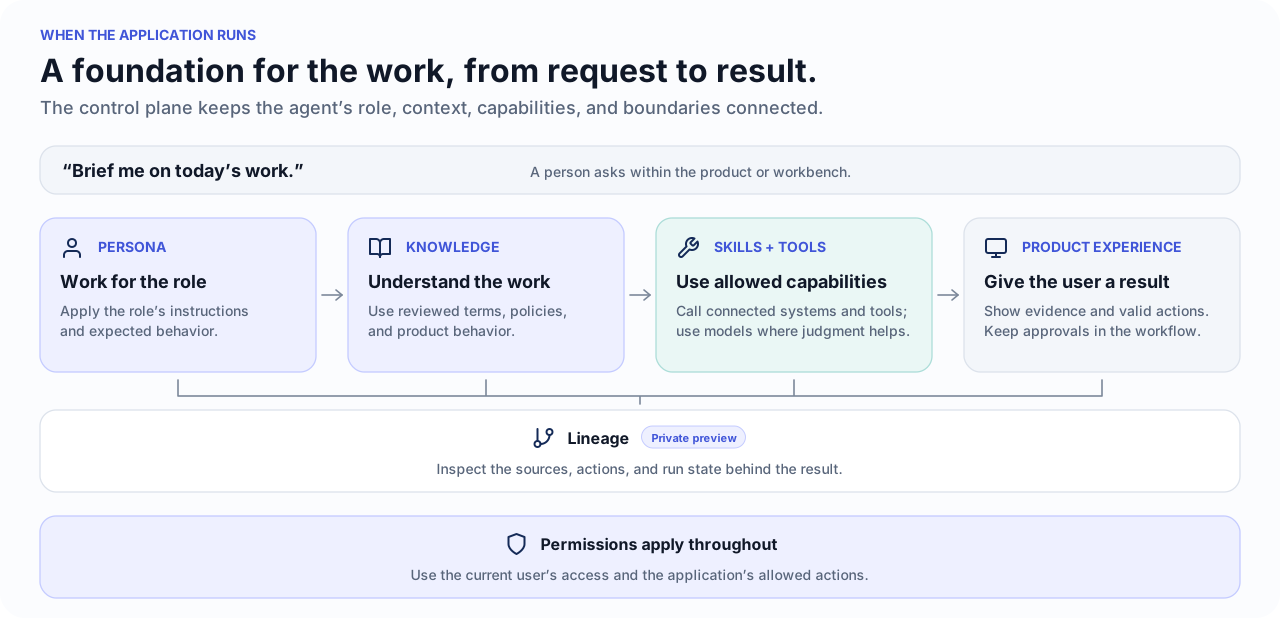
IKE supports both construction and use. The Application Development Kit (ADK) provides contracts for application definition, composition, and Builder workflows. IKE supplies reusable knowledge and agent capabilities for the resulting experience. Builders connect those parts to the application’s code and integrations, then prove the working path with users. The ADK and advanced lineage experiences remain in private preview. The diagrams explain the build and operating lifecycle; each delivery must verify the capabilities and boundaries it uses.
For an existing product, this means making a real workflow inside it agentic. The product contributes its domain meaning, records, screens, valid actions, and operating rules. IKE provides the application construction and operating environment around those things.
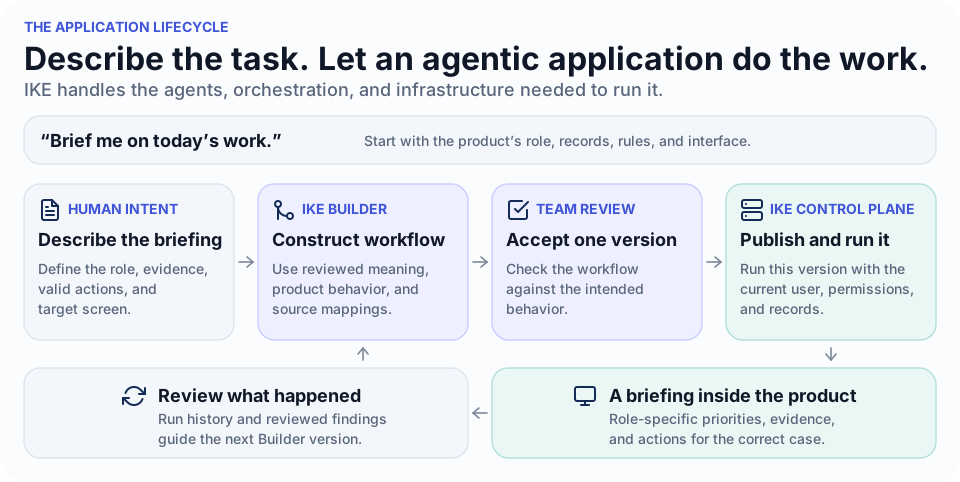
The lifecycle diagram above follows that progression from Builder to an accepted application, runtime, and improvement. Before accepting an intent, SMEs establish the meaning it depends on. The AML example walks through this using one request: “Brief me on today’s work.”
For the briefing, a Persona establishes how the agent should operate for the role, and reviewed Knowledge supplies context for interpreting the work. Skills and Tools provide capabilities, Permissions constrain their use, and available run and lineage evidence supports review of the result.
See the first iteration around an established AML product
We are working with a design partner that has an established anti-money laundering (AML) product. The partnership is building an agentic offering around that product to extend the experience its customers already use. The first iteration gives us a concrete workflow to inspect.
That iteration focused on a workflow in which relationship managers need to understand the cases assigned to them before they contact a client. Compliance officers need the same underlying evidence, viewed through a different role and set of responsibilities.
The example begins with a small but useful slice: brief a relationship manager on today’s assigned cases, explain which items need attention, and provide actions that open the correct case. Even this small slice has to handle project-specific terms, current business records, role-based access, model judgment, predictable navigation, and a screen inside the existing workbench.
A relationship manager opens an agent panel inside the AML product and asks, “Brief me on today’s work.” Producing a useful result requires the application to decide whose cases count as “my work,” which evidence makes a case urgent, what the user may see, and where the briefing should appear. An action on the resulting card must also carry the correct case identity into the next screen.
Establish meaning with SMEs before accepting intents
During SME gathering or import, the team prepares a reviewed account of the domain, the existing product, and the systems the application can use. Establishing nomenclature and an initial ontology is part of this first step. It gives later intents a shared meaning and makes unresolved terms visible early.
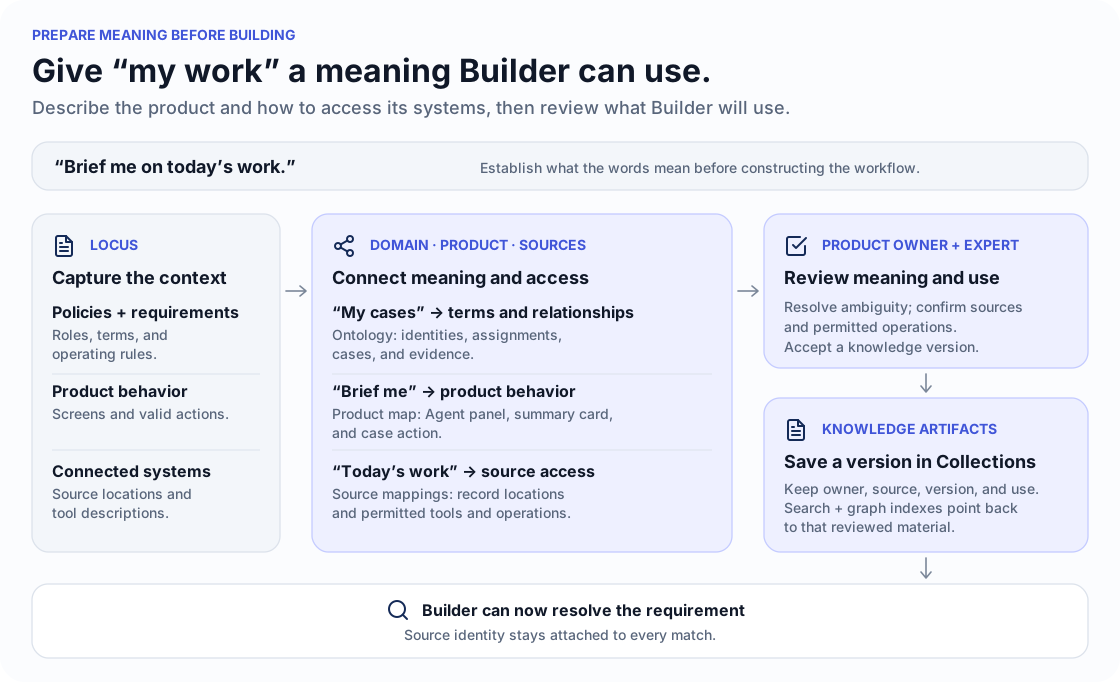
The source material includes research, pages, documents, requirements, data examples, recorded decisions, descriptions of connected systems, and the existing product experience. Locus can help capture source material. The preparation work draws out vocabulary, relationships, methods, expected behavior, available operations, and open questions.
A product owner and subject-matter experts review the proposed knowledge. They agree on terms, resolve ambiguity, and confirm sources, policies, stakeholders, and decision owners. Accepted knowledge needs its source, version, scope, and owner retained in reviewable artifacts and Collections. Integration mappings must explain what source records and operations mean, as well as how to call them.
That review establishes reusable knowledge structures. An ontology describes concepts and relationships; nomenclature gives them consistent names and records aliases. The product map connects expected behavior to available screens and actions. Integration mappings connect those concepts to the systems that hold the facts, including identity, access, freshness, and failure behavior. Relevant material can then be supplied to Builder through its supported knowledge and capability mappings.
For “my urgent cases,” this preparation establishes what each part means: “my” follows product identity and access rules, while “urgent” follows agreed policy and evidence. Resolve uses the relevant reviewed knowledge to connect those meanings to the right sources, allowed tools, and result screen.
Express the expected behavior as human-owned intent
The application’s intent includes a scenario called “Brief me in the Agent panel.” It describes a briefing shaped by the user’s role, supported by current work, and presented as one case-summary card with useful next actions.
The human-maintained source states that behavior in Gherkin before Builder connects it to implementation details:
Scenario: Brief me in the Agent panel
  Given my current work has been gathered
  When the Agent panel prepares my briefing
  Then summarize the complete role-scoped work set in business terms
  And rank the most useful priorities for my role
  And suggest only next actions supported by the current work and my permissions
  And render one case-summary card with a greeting header, ranked priorities, and supported next actions
The requirement is specific enough to review. “My work” means cases assigned to the user’s current product identity, which the application connects to its selected Persona Binding. Priority follows the AML team’s rules and the evidence available for that case. Application roles and policies determine which cases the user may see. Read and navigation actions can open or focus a case. A suggested business change begins as a proposal for human approval.
The same requirement can produce different results for a relationship manager and a compliance officer. Their responsibilities differ, as does the work in front of them. The application preserves the method while applying it to the current role and situation.
To turn that behavior into an application, Builder needs reviewed meanings for the terms in the requirement, an understanding of the product behavior available to it, and mappings to the systems that provide facts and operations. “My work” and “urgent” must resolve to definitions the product team has agreed on.
Builder’s Resolve, Annotate, Materialize, and Skeptic phases use that reviewed foundation to connect the requirement to application details and reviewable workflow artifacts. The team still checks the resulting experience against the human-owned intent.
Keep each map with its owner
Three connected bodies of knowledge guide construction and use: SME knowledge, IKE product knowledge, and integration knowledge. The application’s own behavior and experience connect them. These are perspectives on related knowledge, not a requirement for three separate graph databases.
| View | What it records | Example from AML |
|---|---|---|
| SME/domain knowledge | Terms, relationships, method, evidence, policy, and decision ownership. | What a case means, how priority is interpreted, and who may close it. |
| IKE product knowledge | How to use the ADK, supported components, composition, and Builder phases. | How the briefing intent maps to available knowledge, tools, and presentation contracts. |
| Integration knowledge | Record meaning, operations, identities, permissions, and operational constraints. | How assignment maps to the current user and how to retrieve permitted evidence. |
| Application intent and experience | Human-owned outcomes, valid screens and actions, and acceptance scenarios. | The Agent panel, case-summary card, navigation action, and approval boundary. |
| Derived workflow | The work to perform, its dependencies, and the expected result. | Gather assigned work and its evidence, then prepare the briefing. |
For the “case-summary card,” domain knowledge explains what the summary means, the product supplies the panel and valid actions, and Builder connects the requirement to the evidence and preceding work. Each action retains its case identity when it opens the destination screen. Keeping these details with their owners lets the team change a business term, source connection, or screen in the right place.
Show what the AML product owns and what IKE handles
For “Brief me on today’s work,” the product supplies the business meaning and the IKE control plane operates the application around it. Their responsibilities meet at each step:
| Step | The AML application supplies | IKE Builder and control plane supply |
|---|---|---|
| Open the work | User roles, identity mapping, source connections, case screens, and valid actions. | Control plane hosting, launch, Persona Bindings, and sessions. |
| Prepare the briefing | What assignments, evidence, priorities, and case summaries mean. | Builder workflow, allowed context, step order, and model or tool work. |
| Inspect or act | The exact case, allowed business actions, approval rules, and destination screen. | Control plane access checks, tool calls, result handling, and hosted UI. |
Store knowledge with its identity intact
For the AML briefing, a policy’s owner, source, version, and period of applicability matter as much as its wording. The team needs to know which reviewed meaning of “urgent” the application used.
Keep accepted Knowledge Artifacts and their source identity distinct from search or graph indexes derived from them. The accepted source remains the authority for meaning; an index makes it easier to retrieve relevant material. Verify the actual retrieval and provenance behavior used by the application.
That prepares a reusable account of the domain and product. When the application runs, it also needs the actual work in front of the current user.
Connect the workflow to live systems
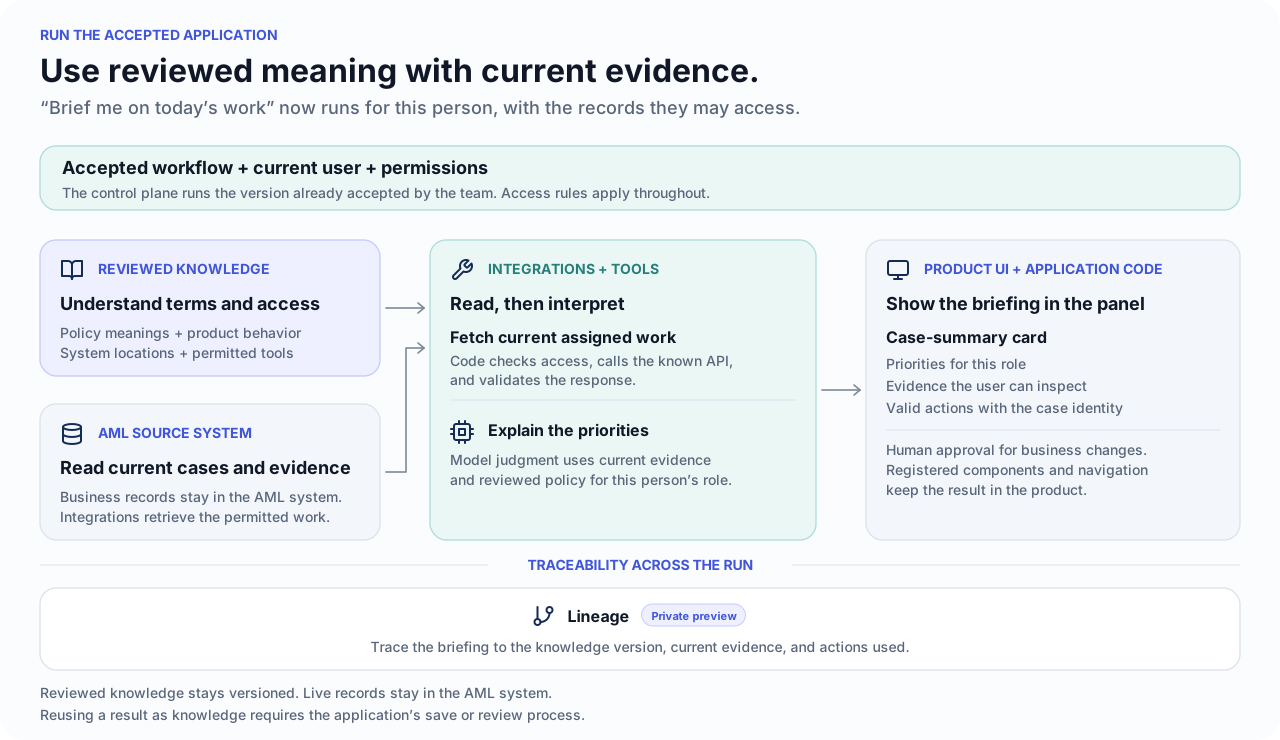
Integration knowledge relates domain concepts to external records, tools, and permitted operations. It informs both how the application is built and how it uses a source during operation. The integration itself supplies current data and carries out permitted operations when the workflow runs.
When the relationship manager asks, “Brief me on today’s work,” the accepted workflow uses those integrations to find their assigned cases and retrieve current evidence. It uses the product’s navigation action to open the right case screen. The records remain owned by the AML source system, and the user’s permissions and product rules apply throughout the run.
The runtime diagram follows this use: the application combines its reviewed understanding with current records for this user. The application’s source and access rules determine which retrieved material and tools it may use.
A model’s explanation is a new result supported by those records and the reviewed knowledge. Making it reusable knowledge requires a deliberate save or review under the application’s rules.
The reusable application may define a common method, while each customer organization has its own policies, terminology, integration bindings, and access. A case adds current evidence, participants, ownership, and decisions. Map these scopes explicitly: a shared method must not carry one customer’s private context into another customer’s work. A local finding changes the shared method only after review.
Build with IKE. Run on the IKE control plane
Builder now has the inputs assembled above: human-written intent, reviewed domain meaning, the product experience, integration mappings, available capabilities, and applicable controls. Its phases produce artifacts for review and application integration. The team completes and verifies the chosen deployment and runtime path before putting that version into use.
The construction method uses Builder’s four phases, followed by application delivery and operation:
- Resolve connects the requirement to reviewed meaning, product behavior, source mappings, and permitted tools.
- Annotate links the scenario to concrete application details: source mappings, tools, screens, and rules.
- Materialize produces workflow artifacts, including the work each step depends on and the result it should produce.
- Skeptic looks for gaps between the workflow and the original intent.
- Integrate and release completes the application code and experience, verifies acceptance scenarios, and configures the supported hosting and access path.
- Run uses the accepted version with the current user, permissions, records, models, APIs, and tools. MetaC coordinates declared work in the supported execution path; source access and business rules remain explicit application and integration responsibilities.
- Observe and improve uses available sources, actions, lineage, and run state for review. Accepted findings can inform the next knowledge or application version.
For the briefing, the prepared workflow connects gathering the user’s assigned work, obtaining the evidence, and presenting a useful summary. The team tests and accepts a version before putting it into use. Each request runs that workflow with the current user and records, so the briefing reflects the work in front of that person.
Use model judgment where it helps the work. Keep deterministic product behavior in application code. Interpreting incomplete evidence or explaining a case may require a model. Checking permission, calling a known API, validating its response, rendering a registered screen component, and navigating to the correct case belong in application code.
Tests need to cover both. A valid workflow can still produce a poor explanation. A strong model score does not tell you whether the right card appeared or whether its action opened the right case.
Follow the chain back from the screen
To inspect why a briefing ranked a case first, the team needs to connect what appeared on screen to how the application was built and what happened in that run. The AML workflow keeps the briefing requirement, its annotations, business meaning, application details, and saved workflow in separate records that can be reviewed together. Lineage and run history connect the result to the sources and actions used during execution.
The saved artifacts show how the application was prepared. A live demonstration proves what a particular application build, knowledge version, and runtime configuration actually do. A release needs both kinds of evidence.
Apply the pattern to your project
The AML example brings a role-specific briefing into an established product, with evidence and actions tied to the relevant case. The product continues to own its domain, records, policies, actions, and interface. IKE’s contracts and capabilities support building and operating the knowledge application around that work; the accepted implementation must demonstrate the result.
This is one starting situation. An SME may instead bring an idea or wireframe, a builder a prototype, or a team data that needs meaningful delivery. The builder journey adapts the work to those inputs. In each case, establish the meaning with SMEs, then agree what people need to accomplish, what evidence and actions are permitted, and where the result belongs.
The Agent Application model explains the wider architecture. A Design Partnership starts with one end-to-end path through your own workflow.